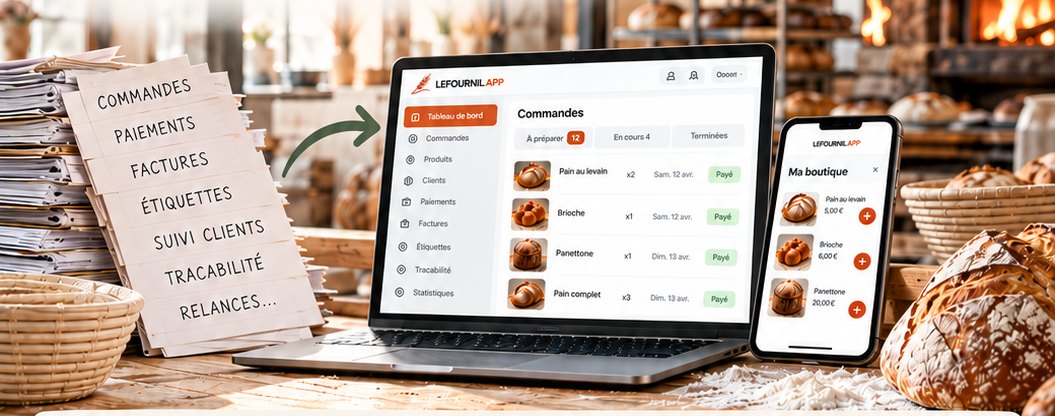
A tool built for micro-bakeries and sourdough bakers

More bread, less paperwork.

Save time. Sell more.
A more profitable business.

A bakery's paperwork — orders, payments, invoices, labels, traceability — replaced by a single screen.

Try it free for a month See the prices

No bank card. No commitment. From €40 a month.

From the order to the label, without typing anything twice

  1. Orders

    Your customers order online

  2. Payment

    Payments secured by Stripe

  3. Invoices

    Generated automatically

  4. Labels

    Ingredients, weight, use-by date, batch number

  5. Traceability

    Ingredients, batches and allergens

  6. Customers

    Customers kept informed, customers who come back

  7. Business

    Catalogue, standing orders, invoices with due dates

  8. New

    My online shop

    Sell to all of France, all year round

    See the details ↓
  9. New

    My assistant

    You talk, it types for you

    See the details ↓

Save time

Everything in one place.

Sell more

Reach more customers with online ordering.

A more profitable business

Fewer mistakes, less waste, better organisation.

Written by a baker, for bakers

This is not a till system adapted to bakery. It is the tool I wrote for my own bakery, because none of them brought together what a micro-bakery has to hold at once: its recipes, its bakes, its sales, its collection points, its accounts and its traceability. Six folders, six spreadsheets, six chances to get it wrong.

The thing that changes everything

Everything in one place — and talking to each other.

Your recipes, your bakes' production calculations, online selling, your business orders, your collection points, your financial tracking and your traceability are not seven tools: they are the same one. What you enter on one side comes out on the other, without you copying anything.

  • Your recipes entered once, with their ingredients and their costs.
  • The bake calculations that follow: quantities, weighing, cost price.
  • Online selling: the customer pays when ordering, the invoice goes out on its own.
  • Your business orders: restaurants and grocers order from your catalogue, you issue order forms and invoices with due dates, and one screen tells you what to produce, depot by depot.
  • Your collection points: depots, opening hours, parcel shops — the customer chooses, and it is printed on the label.
  • Your financial tracking, bake by bake and month by month.
  • Your HACCP traceability, kept as you go with no extra work.

TRACEABILITY T80 flour — batch of 12/03/2026 Supplier Moulin de la Vallée Received on 12/03/2026 · 25 kg Used in 3 bakes 14/03 — Country loaf34 pieces 17/03 — Country loaf28 pieces 21/03 — Rye loaf16 pieces Handed to 18 customers Camille M. — CMD-2026-014214/03 Bruno T. — CMD-2026-014717/03 …and 16 more, with their contact details Produced in one click from the ingredient's record
In the event of an inspection: one batch, the bakes it went into, and who took it away. Without searching through a folder.

Selling to businesses, without the phone and the notebook

A restaurant does not order the way a private customer does: it wants a catalogue, its own prices, a collection date, an order form and an invoice with a due date. All of it is here, beside your retail sales — and the two come together when it is time to mix.

A trade catalogue of your own

You choose which products and which sizes your business customers can order — a restaurant takes 1 kg loaves, not 500 g ones — and you set your price line by line. A price left empty follows the product's price: your catalogue does not go stale the day you change your prices. And you can grant one customer a price of their own.

The orders that come back every week

“Every Tuesday, 50 loaves at the Comptoir”: your customer says it once. Every week the order is created, numbered and they are told — without them reconfirming it and without you re-entering it. You set the day and the time the following week closes. If they stop, the week under way is still due: you have bought your flour.

Nothing is promised until you have confirmed it

A one-off request comes in, and it commits no one: you correct a quantity, turn down a line you do not have, move the date. Only then does the order form go out, and only then can it be invoiced. Your customer reads what changed, and why.

You take the order yourself too

Because a business customer does not always open their own area: they ring. You enter it from your screen, and one tick box makes it a standing order. The cut-off you impose on your customers does not apply to you — it is a promise made to them, not to yourself.

One label per customer, not fifty

A canteen taking 50 rye loaves has no use for fifty identical stickers: it gets a single one, carrying “× 50” in large type. It is the first figure you check when loading and the only one they count on receiving. Same roll, same ingredients and same allergens as your collection labels.

The week's planning, both kinds of customer together

You have only one oven and you mix once. One screen gives you the week's baking dates, day by day, with the quantities added up per product — your retail and your business customers — and the dough to prepare that follows from them. Beside the total, who is waiting for what: that is what lets you load the van.

The wording a business-to-business sale requires

Order form and invoice are numbered and go out to both sides. The due date is that customer's, within the legal limit; the late-payment interest and the recovery charge are written out, at the rate in force on the day of issue. An invoice past its due date flags itself — but chasing it is still up to you.

They pay the way you decide

Online, on invoice, or both depending on the customer. Online payment goes through your own Stripe account: the money comes to you, directly, and the platform never touches it. And paying is not confirming — it is you who commit to producing.

An online shop: sell to everyone, all year round

Your bakes sell around you, for a given day. Your shop is open whenever you decide, to all of France: what travels well — panettone, biscuits, keeping breads — is ordered as it comes, paid online and sent to a Mondial Relay pickup point. One more clientele, without one more selling day.

Open all year round, or for a season

A switch opens and closes it. Closed, it shows your message — “back in November”. It has its own page on your site, with your photo, and you put in the products you want by switching on a toggle on their record.

Ordering without creating an account

Your customer picks their products and their pickup point, gives their details and pays by card: their account is born with the order. They do not get your local bake announcements for all that — they may live at the other end of the country.

A weekly maximum: you only promise what you can bake

“36 panettone a week, plain and flavoured together.” Beyond that, the shop shows “sold out this week” and sales resume the following Monday. You raise the maximum in one move if the oven allows.

Sold out? A waiting list, in order

Your customers sign up. As soon as a place comes back — a cancellation, a raised maximum, a new week — the first one is told by e-mail and the place is held for them for 48 hours. No sale lost, and nobody jumps the queue.

Bake by batch, not one by one

Five panettone ordered? You bake a batch of nine, and the four extra go to the next orders. Stock is tracked, and the week's planning tells you how many batches to start — alongside your usual bakes, since it is the same oven.

Prepare, ship, notify

Each order goes from “to do” to “done” then “shipped”. On shipping, your customer gets an e-mail with the Mondial Relay tracking link for their parcel. You see at a glance what is left to prepare.

Shipping: free or charged, and what it really costs you

You set the shipping your customer pays, product by product — at zero, “Shipping offered” shows prominently. Against it, the Mondial Relay rate and the carton: your product list shows the profit on a piece collected and on a piece shipped.

Paid before it is prepared

The order is paid online, into your own Stripe account: the money goes to you, directly. You only prepare what is paid, and the invoice goes out by itself.

Your assistant: you talk, it types

A 🎙️ button at the bottom of every screen, on your phone. You say what you want to do, or you take a photo, and the assistant enters it for you — with the same rules as if you had typed it. Hands in the flour, you no longer have to set your phone on the kneader to fill in a form.

A recipe in one sentence, or one photo

“Country loaf: one kilo of T80, 750 g of water, 200 g of levain, 15 g of salt.” Or the photo of your recipe card, even handwritten. The recipe is created, along with the missing ingredients and their nutrition values when the Ciqual table knows them.

A delivery in photos

You photograph the labels of your bags and cans: one batch per product, with its number, its use-by date, its weight and its maker. The photo stays attached to the batch — your traceability is done before the delivery is put away.

Your bakes, by voice

“Bake next Tuesday, 8 panettones and 12 country loaves.” It is prepared with your prices and your usual closing time. If a word matches several products, it asks you which one rather than guessing.

Anything that reaches your customers waits for your go-ahead

Publishing a bake, sending an announcement, telling a pick-up point's customers: the assistant prepares it, shows you what will go out — “18 e-mails, 6 notifications” — and nothing moves until you tap “Confirm”.

Everything can be undone in one tap

Every entry shows in a card with an “Undo” button, and a log keeps track of everything it did, with the sentence that triggered it. A misheard word only costs you one tap.

Included in your subscription

No meter to watch and no extra bill: the assistant is included, with a gauge that shows what you have used this month. It never reads your customers' data.

What you stop doing

Telling your customers one by one

You publish your bake: an email and a notification go out to those it concerns, with the photos, the weights and the prices. A sold-out product marks itself.

Chasing payments

The customer pays when ordering. The money goes to your account, never to mine. The invoice goes out, numbered, in your name.

Writing your labels

Ingredients in order of weight, allergens, weight, use-by date, batch number, customer's name: one label per piece, ready for your thermal printer.

Recalculating a recipe for every bake

You ask for 34 pieces of 750 g: the weighing sheet comes out to scale, dough by dough, with the levain counted on both sides. No rule of three scribbled on a flour sack at five in the morning.

Copying out your cost prices

The ingredient cost follows your purchase batches. You see what a piece costs you, ingredient by ingredient, before setting your price.

Keeping your traceability by hand

A photo of the sack on your phone and the batch is recorded. On inspection day, you start from an ingredient and you get the bakes it went into and the customers who took them away — without opening a folder.

Taking trade orders over the phone

Your restaurants and grocers order for themselves, from a catalogue, for the collection date they choose — at your trade prices, and before the cut-off you set. What comes back every week recreates itself; the rest waits for your confirmation. And the week's planning adds up both kinds of customer, product by product. Everything the business area does.

Working out your VAT by hand

Small-business exemption or liable, one rate or several: you choose each product's category, the tool works out the rest and writes it on your invoices — with the mandatory wording, the due dates and the late payment penalties.

Doing your accounts on Sunday evening

Turnover, ingredients, oven electricity, packaging, contributions: the month's summary is already done, bake by bake.

How it works

  1. You ask

    The form at the bottom of the page. Two minutes, no bank card.

  2. I reply

    I open your bakery and send you what you need to log in.

  3. You try it for a month

    With your real recipes and your real prices. You prepare a complete bake to see how it goes. Your shop stays private: nothing is online, nobody can order.

  4. You subscribe — or not

    The subscription opens selling. If you stop there, you owe nothing, and you have given no payment details.

What it costs

One price, all in. No commission on your sales: what your customers pay is yours.

Monthly

50 €per month

  • The whole tool, no limits
  • Your assistant included
  • Cancel without notice
  • You stop whenever you want

Try it for a month

Most popular

Yearly

480 €per year

  • That is €40 a month
  • Your assistant included
  • €120 saved over the year
  • Paid in one go

Try it for a month

Yearly, referred

360 €per year

  • That is €30 a month
  • Your assistant included
  • As soon as a fellow baker follows you
  • Explained just below

Try it for a month

Referral, in plain terms

You tell a fellow baker about the platform. If they take a full year, your next year goes from €480 to €360. As long as they renew for a year, you stay at €360.

And the day they do not renew, you go back to €480 — but never mid-year: your price is set when you renew, and it holds for the twelve months that follow. One referral is enough; further ones do not bring it down any more.

The questions I get asked

Who receives my customers' money?

You do. Online payments go through your own Stripe account: payments arrive with you, refunds leave from you, and the platform never touches them. The bank fees are those of your contract, not mine.

I sell to restaurants: does it keep up?

Yes. Your business customers get their own area: a catalogue at your prices excluding tax, an order for the collection date of their choice before the cut-off you set, a numbered order form, and an invoice on terms with the mandatory wording. And a screen tells you what to bake each day, collection point by collection point.

And if I become liable for VAT?

You change your regime on your bakery details, and that is all: your displayed prices do not move — the tax is taken out of them — and your invoices now carry the breakdown by rate. Nothing to type again, no product to revisit.

What if I do not have a Stripe account?

You can sell without one: the customer orders, you take payment as usual — bank transfer, cash, Paylib — and you mark the order as paid. The invoice still goes out, numbered.

Who owns my recipes?

You do. They are visible to no other bakery, and you can ask to get them back or to erase everything whenever you want.

What happens if I stop?

Selling closes, but nothing is deleted: your recipes, your bakes and your invoices stay available, and your customers keep their account. The law requires you to keep your invoices for ten years — the moment you leave is not the moment to lose them.

Do I need to be comfortable with computers?

Everything is done from a phone or a computer, with nothing to install. A complete handbook is built in, written for a baker and not for a computer specialist. And during the trial, I answer.

How long does it take to get started?

The longest part is entering your recipes — allow an evening for about ten. The rest (products, a bake, a first announcement) fits in an hour.

Discover Lefournil.app

Write to me. I read everything, and I reply to everyone.

It will become your shop's address — you can adjust it later.

The name of the bakery that told you about the platform: they get a discount for it.

What you bake, where you are, what you are looking for. Nothing is required.

No payment at this stage, no bank card, no commitment.